
Lorebooks: keep your world consistent
Write down the places, people and rules of your world, and the character gets each fact when it comes up in the chat.
A lorebook lists facts about a world: places, people and rules. Each entry has keywords. When one of them comes up in the chat, that entry is sent to the AI with the reply, so you don’t have to repeat it.
Open your lorebooks
Open Settings › Manage Lorebooks. Every lorebook you have is listed here, with a switch beside it.
- Switch a lorebook on to use it in every chat.
- Leave it off and attach it only where it belongs: in a launcher, or in one chat’s ⋯ › Chat Settings.
Add or import a lorebook
The buttons at the top of Manage Lorebooks add a lorebook:
- Add New starts an empty lorebook.
- Import File opens a JSON lorebook file, such as SillyTavern world info or a character book.
- Import from Paste takes the lorebook’s JSON text. Tap Import.
Card sites have lorebooks too. Paste a lorebook page link in Import Card › Paste a link, and the preview offers Add to Lorebooks.
Write entries
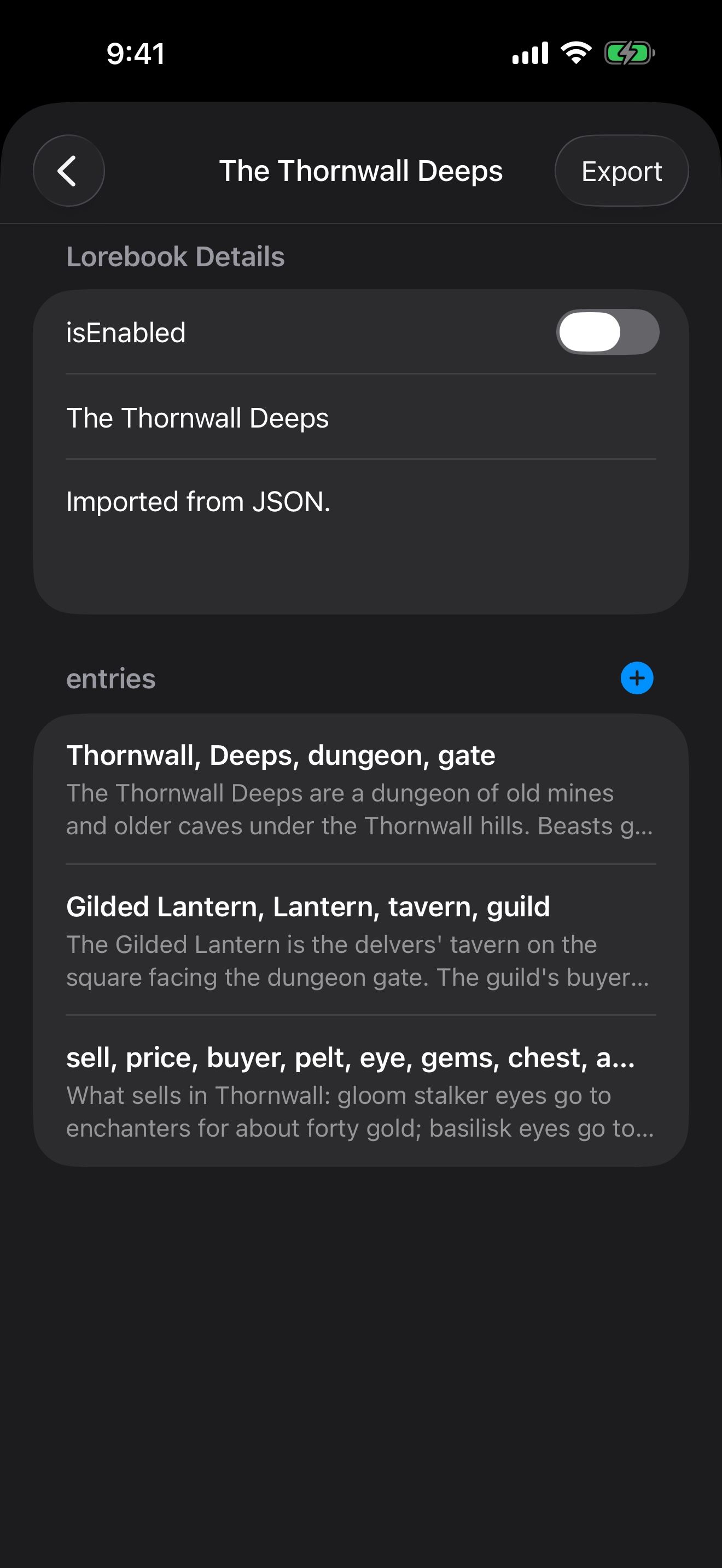
- Open a lorebook and tap the + beside its entries.
- Under keys, type the words that should bring it up, separated by commas. For example:
Thornwall, Deeps, dungeon, gate. - Under content, write what the character should know.
- Choose a strategy. Normal entries activate when one of the keys is found in recent chat history. Constant entries are always included.
- Tap Save.
Long-press an entry to Edit or Delete it. Tap Export at the top to share the whole lorebook as a file.
Lorebooks inside cards
A character card can include its own lorebook. Crimson Frost’s card includes The Thornwall Deeps: mention the Deeps, the Gilded Lantern or what sells, and the matching entry is used with no setup. See Meet Crimson Frost.
Where lorebooks apply
- Everywhere: a lorebook switched on in Settings › Manage Lorebooks.
- One character: the lorebook inside their card.
- One way of starting a chat: a launcher’s Lorebooks. See Launchers.
- One chat: ⋯ › Chat Settings.
A lorebook holds facts you write about the world. A memory learns what happens in your chats. You can use both: see Memory: characters who remember. To have Character Agent write a lorebook for you, see Build a world by talking.
Keep going
Memory: characters who remember
How memories learn and recall, and how to review, pin, edit, import and export their entries.
Build a world by talking
Ask Character Agent to create characters, lorebooks and launchers for you, and approve every change.
Character Agent · Lorebooks · Launchers · MCP tools · Swipe, edit and branch