
Guide
Moving from Character.AI
Character Agent is a free Character.AI alternative for iPhone, with voices, personas and memory. Two ways to bring your characters and memories over:
- A fast way you can do today on your iPhone
- A slow way that exports everything
Last updated
Get Character Agent freeWhat's going on
On October 12, 2026, Character Technologies, the company behind Character.AI, filed for Chapter 11 bankruptcy. It is using the case to sell the company under the supervision of the court.
- Character.AI says its platform is still running and you can keep using it.
- It expects the sale to finish in late November or early December 2026.
- If no suitable buyer comes forward, Character.AI says the platform will be wound down.
- On November 4, 2026, the court approved the rules for selling the company. It hears the sale on December 3 and 4, 2026.
A sale could change the service or end it, so save the characters and chats you care about now.
Sources
- Character.AI: An Update on Character.ai, October 12, 2026
- Case website for Character Technologies, Inc., case 26-11603 (BLS), U.S. Bankruptcy Court for the District of Delaware, run by Stretto, checked November 11, 2026
- Reuters, via NBC News: Character.AI files for bankruptcy, October 13, 2026
- Character.AI Help Center: How do I download my data?, checked November 11, 2026
Two ways to move
- The fast way Recreate your most important characters and memories in Character Agent, with its built-in agent. It runs on your iPhone, and you don't wait for anything.
- The slow way Export everything from Character.AI and import it. Character.AI says its exports "can take 3-4 weeks to process," and CAI Tools needs a computer or an Android phone.
Start with the fast way. Your most important characters and memories are then in files you own and can export, whatever happens to Character.AI. Then do the slow way for everything else.
The fast way: recreate your favorites
Start with your most important characters.
Recreate a character
- Install Character Agent. Choose an AI model: tap Start Free Trial in Settings, or add your own AI key in Settings › Model Setup.
- On Character.AI, open a character you want to keep and copy what you can see: its name, greeting and description. For characters you made, copy their definition too.
- In Character Agent, tap the Character Agent launcher on the home screen. Paste what you copied and ask, for example: "Create a character named Mara from this."
- Fill in the rest from your own memory. Tell Character Agent what to change, for example: "Add to Mara's description that she grew up by the sea." You can also open the character in your library and edit it yourself.
Give it your story so far
- Start a chat with the character.
- Open the ⋯ menu, choose Chat Settings, tap Memories, then Attached, then New Memory.
- Send a recap of your story as a message: who you are to each other, what happened, and what's still open. The character answers it like any message.
- Tap the brain in the chat's header, then Learn Now. The memory turns the recap into entries. Check them, and pin the ones that matter most.
Next, make a launcher for the character. Every chat it starts uses the same memory. See A character who remembers you.
You own your Character Agent data
Be aware: many platforms are closed. Character Agent is radically open.
On a service that keeps your characters on its servers, getting a copy out is up to the company. Character.AI says its exports "can take 3-4 weeks to process." Character Agent works the other way:
- Your characters, chats, memories and pictures are stored on your iPhone and iPad, and sync through your own iCloud account.
- You can export any of them from the app at any time: characters as PNG or JSON cards, chats and memories as files, and pictures to Photos.
- Character cards use the standard format that other character apps import.
The slow way: export everything
Needs a computer or an Android phone. Character.AI says its exports "can take 3-4 weeks to process."
Do this too, for the characters and chats you didn't recreate.
Step 1: request your data from Character.AI
Character.AI's own export is a copy of your account data. Ask for it now.
- On the website, open your profile, then Profile Settings › Account › Manage Account & Data › Export Data.
- In the app, open your profile, tap the settings icon, then Legal & Privacy › Export Data.
Character.AI's Help Center says: "Your export may take 3-4 weeks to complete." It emails a download link to your account's email address. The link works for 7 days, so download the file as soon as it arrives.
Step 2: save characters and chats with CAI Tools
CAI Tools is a browser extension from an independent developer. It isn't made by Character.AI or by us. It's free to install, with some paid extras.
- Install CAI Tools from the Chrome Web Store or Firefox Add-ons.
- Sign in to character.ai and open a chat with a character you want to keep.
- Click the CAI Tools button in your browser's toolbar.
- Under Character, choose Download › Character Card. You get a PNG picture with the character inside. If the character has no picture, choose JSON format instead.
- Under Chat, choose Download, then PDF for a copy you can read anywhere, or Tavern / Silly T. for a chat file.
- Do this for each character you want to keep. Then save the files to iCloud Drive, so they're in the Files app on your iPhone.
If a character's creator kept its definition private, the card comes without it.
Step 3: import the character cards
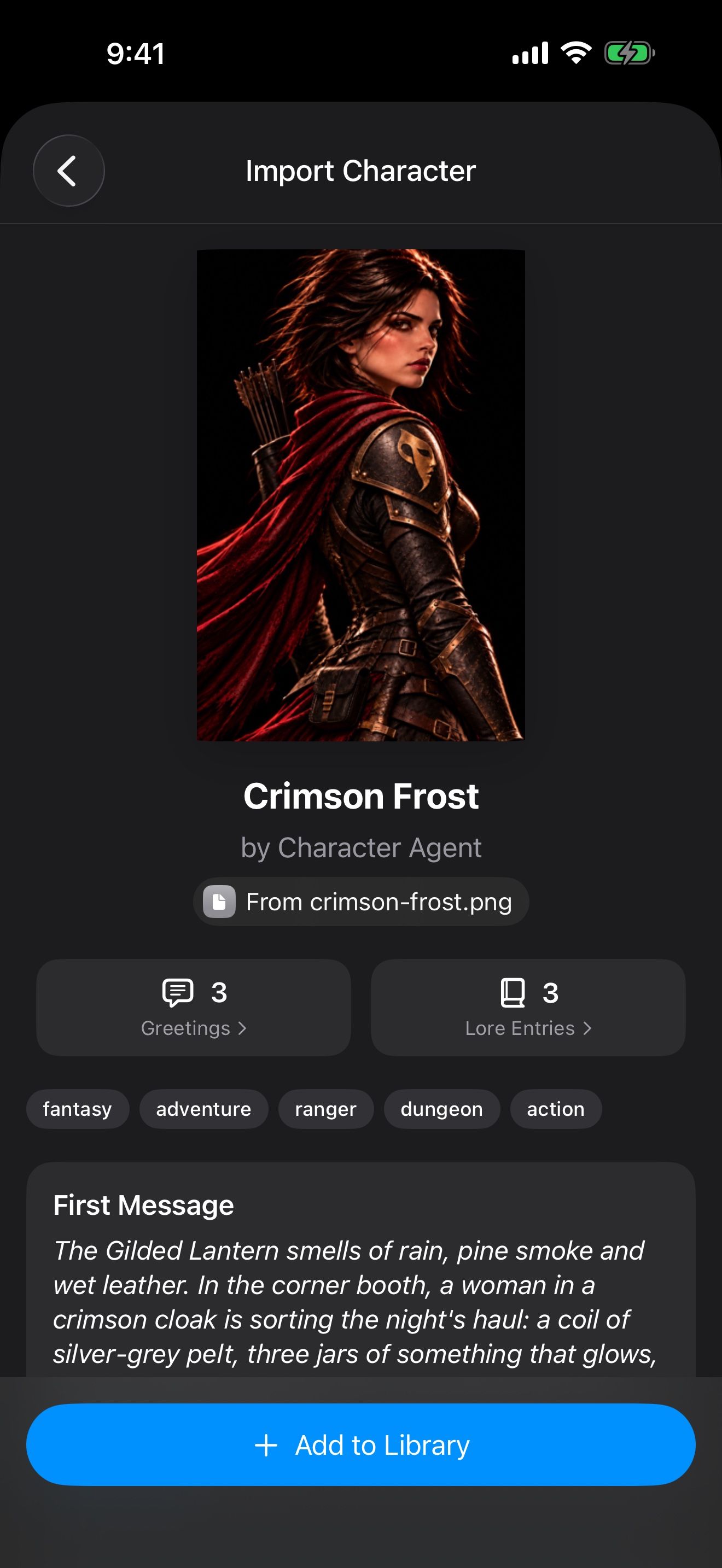
- Open the Manage Characters menu at the bottom of the home screen and tap Import Card.
- Tap Choose a File and pick the PNG card. For a JSON file, open it, copy all of its text, and tap Paste Card JSON instead.
- Check the preview, tap Add to Library, then Start Chat.
Every way to import a card is in Import character cards. To give a character a memory and a voice once it's in, see Bring your characters home.
Your chats
Import the chats you saved with CAI Tools as Tavern / Silly T. files. You need the latest version of Character Agent. Import the character's card first: the chat is attached to the character in your library with the same name.
- Open the Manage Characters menu at the bottom of the home screen and tap Import Chat.
- Pick the chat file. When you see Import Successful, the chat is in History.
- Open the chat. To let the character remember it, open the ⋯ menu, choose Chat Settings, tap Memories, then Attached, then New Memory.
- Tap the brain in the chat's header, then Learn Now. The memory learns from the messages you imported.
Without a chat file, you can still give the character your story:
Pick up your story now: send one recap and let the memory learn itOr add what the character should know by hand:
- Start a new chat with the character you imported.
- In the chat, open the ⋯ menu, choose Chat Settings, tap Memories, then Attached, then New Memory.
- In the memory, tap Add Entry for each thing the character should know: names, promises, and where the story stopped.
From then on, the memory learns as you chat. You can read, edit and pin every entry.
What comes over
| From Character.AI | In Character Agent |
|---|---|
| A character card from CAI Tools: name, greeting, description, definition and picture | Imports with Import Card |
| A chat file from CAI Tools | Imports with Import Chat in the latest version of Character Agent. A memory can learn from it. |
| Character.AI's data export | Keep it as a backup of your account. |
| Memories and personas | Don't come over. Add facts to a memory, and make a persona for yourself. |
Why Character Agent
- Memory you can read. A memory learns from your chats. You can review, approve, pin, edit and delete every entry, and export the memory as a file.
- Voices on your iPhone. Heart is built in, and Kokoro and Ming are free downloads. You can clone a voice on iPhone 15 Pro or newer.
- Pictures. Create pictures in your chats, with a reference picture so a character keeps the same look.
- Every feature is free. A subscription only adds AI models we host. You can use your own key from an AI provider instead, and the provider bills you.
Character Agent runs on iPhone and iPad with iOS 18.2 or later, and is rated 18+ on the App Store.
Questions
Will my chats come over?
Yes, with the latest version of Character Agent. Save each chat with CAI Tools as a Tavern / Silly T. file, then import it with Import Chat. You get its messages, and a memory can learn from them. The steps are in Your chats.
Do I need a computer?
For CAI Tools, yes, or an Android phone with Firefox. You can request Character.AI's own export from its iPhone app. Importing characters into Character Agent happens on your iPhone or iPad.
Is Character Agent free?
Yes. Every feature is free, including importing characters, memory, voices and images. Use your own key from an AI provider, and the provider bills you. An easy, optional AI subscription is available in the app for your convenience. Use every feature for free.
What about my characters' memories?
Memories from Character.AI don't come over. Attach a memory to the character in Character Agent and send a recap of your story, then tap Learn Now in the chat's memories. The memory learns as you chat after that, and you can add facts yourself with Add Entry. Memory: characters who remember.
Can I still use Character.AI?
Character.AI says its platform is still running and you can keep using it. You can use both apps while you move.
Why is part of my character's card empty?
If the character's creator kept its definition private, CAI Tools can't download it. You can fill in the missing parts in Character Agent's character editor. Create a character.
Bring your characters home
Character Agent is free on the App Store for iPhone and iPad.
Download Character Agent on the App Store