
SillyTavern on iPhone
Move SillyTavern chats and characters to iPhone
Character Agent is an iPhone and iPad app that imports what you made in SillyTavern: character cards, World Info and lorebooks, Chat Completions presets, and chats with every swipe. Export the files from SillyTavern, put them where the Files app can see them, and import them.
Last updated
Character Agent is free on iPhone and iPad.Get Character Agent free
1. Export from SillyTavern
On the computer that runs SillyTavern:
- Characters: use Export character in the character’s panel to save the card.
- Chats: open Manage chat files. Each chat in the list has a button that exports it as a file that can be imported again. Don’t use the plain text download: SillyTavern’s documentation says it loses the data needed to import it.
- World Info and lorebooks: export each one as a JSON file. A lorebook inside a character card comes with the card.
- Prompt presets: export your Chat Completions preset as a file.
2. Put the files on your iPhone
Save the files somewhere the Files app on your iPhone can open, such as iCloud Drive.
3. Import into Character Agent
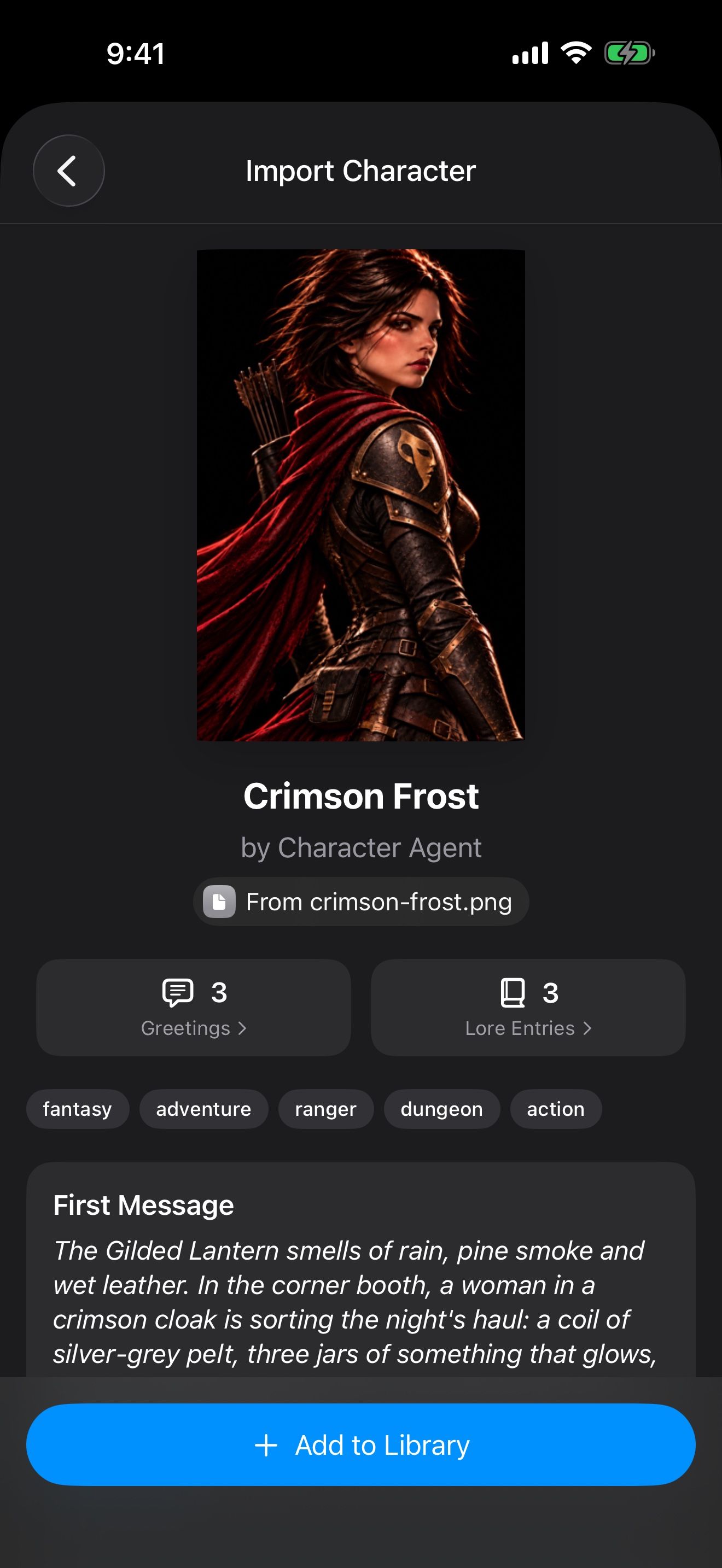
Import characters first. A chat is linked to the character whose name it carries, so the character should be in your library before its chats.
- Characters: open the Manage Characters menu at the bottom of the home screen, tap Import Card, then Choose a File. PNG, JSON and CHARX cards work, v1, v2 and v3. Check the preview and tap Add to Library.
- Lorebooks: open Settings › Manage Lorebooks and tap Import File.
- Prompt presets: open Settings › Prompt Presets and tap Import from File. In Settings › Story Settings, set the preset to SillyTavern to use it.
- Chats: open the Manage Characters menu and tap Import Chat, then choose the chat file. It appears in History.
If you play as a persona with the same name as in SillyTavern, the chat is linked to that persona too.
4. Pick the story back up
- Attach a memory to an imported chat and choose Catch Up. It learns from the earlier messages. See Memory.
- Connect your AI provider with your own key, or your own model server: Use your own API key.
- Talk to them out loud: Voice and hands-free calls.
Janitor AI chats
Import Chat opens chat files in the SillyTavern format, which end in .jsonl. A Janitor AI chat saved in that format imports the same way.
If you have the character as a card file (PNG, JSON or CHARX), import it as in step 3. More in Janitor AI alternative with an iPhone app.
Questions
How do I move my SillyTavern chats and characters to my iPhone?
Export each character and chat from SillyTavern, save the files to iCloud Drive, then in Character Agent use Import Card for characters and Import Chat for chats. Import the character before its chats, so each chat is linked to its character.
Do my swipes come over?
Yes. A chat file keeps every swiped reply, and Character Agent imports them.
Can I import my Janitor AI chats into an iPhone app?
Character Agent imports chat files in the SillyTavern format (.jsonl). If you have a Janitor AI chat saved in that format, Import Chat opens it.
Can I move everything back later?
Yes. Export characters as PNG cards or JSON, lorebooks and chats as files, and prompt presets as JSON, one item at a time.
Sources
- SillyTavern documentation: Chat File Management, checked November 23, 2026
- SillyTavern documentation: Characters, checked November 23, 2026
Step by step in the guides
Bring your characters home
Move your cards, lorebooks, presets and chats from other apps and card sites, then give them memory and a voice.
Discover Characters · Card import · Lorebooks · Story settings · Chat history · Memory
Import character cards
Bring in character cards from a file, as pasted text, or from a link to the card file, pasted or shared from your browser.
Chat history
Find, rename, summarize, export and import chats.