
Features
Memory
Character Agent is an AI character chat app for iPhone and iPad where each character can keep a memory of your story. A memory learns facts from your chats, brings the relevant ones back into later replies, and lets you read, edit, pin and delete every entry.
Last updated
Character Agent is free on iPhone and iPad.Get Character Agent free
What a character remembers
A memory is a notebook a character keeps about your story: events, promises, secrets and how characters change. It belongs to a character or a story arc, not to one chat, so the same memory can be attached to as many chats and launchers as you like.
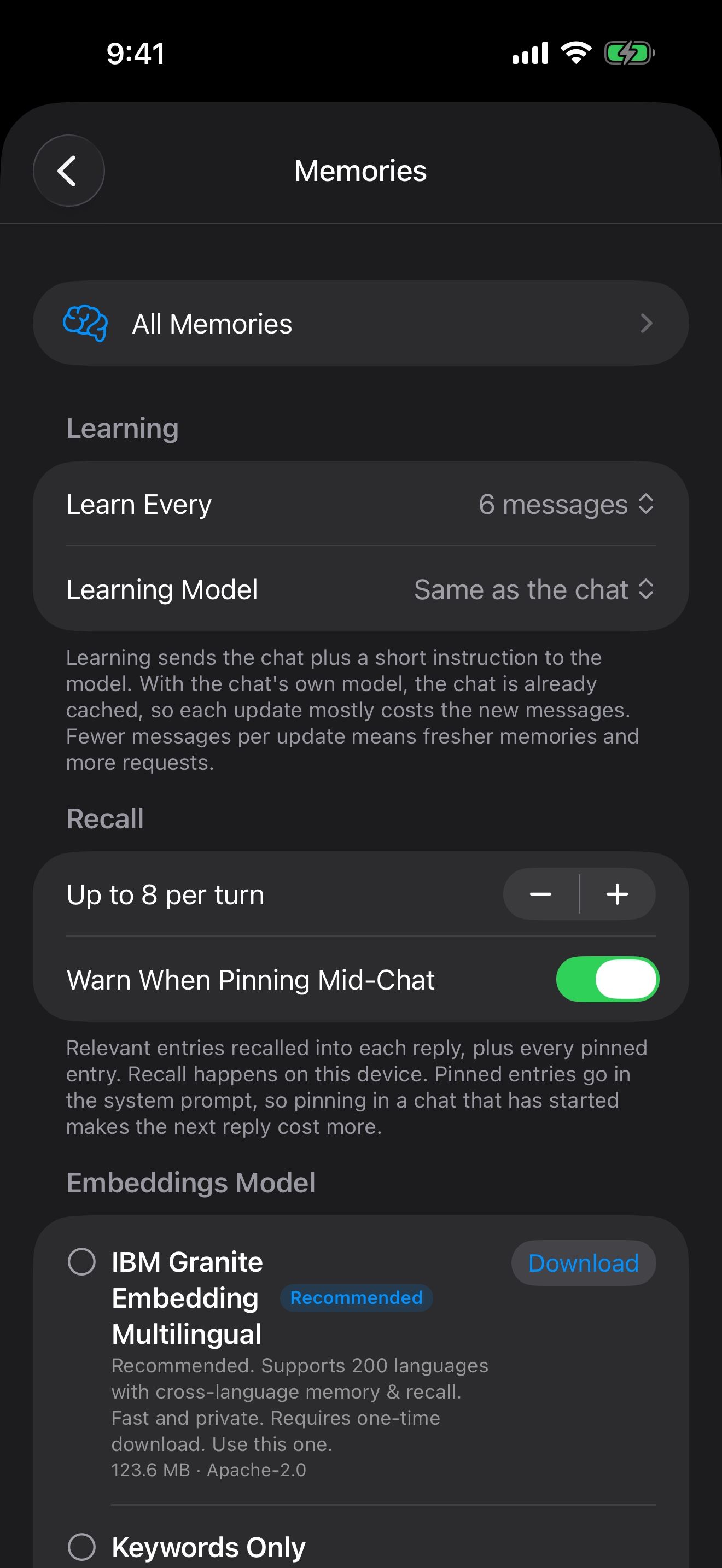
A memory learns as you chat. You choose how:
- Automatic: new entries are saved as the chat goes.
- Suggest: new entries wait for your approval before they are recalled.
- Manual: it learns only when you tap Learn Now.
Learn Every sets how many messages pass between updates, from 2 to 20.
How a character recalls
Each reply, the character gets the most relevant entries, up to a number you set, plus every pinned entry. Recall runs on your device.
Entries are found by keyword, which is built in. A downloadable embeddings model also finds them by meaning. It runs on your device, and your chats are not sent anywhere to do it.
Edit what a character remembers
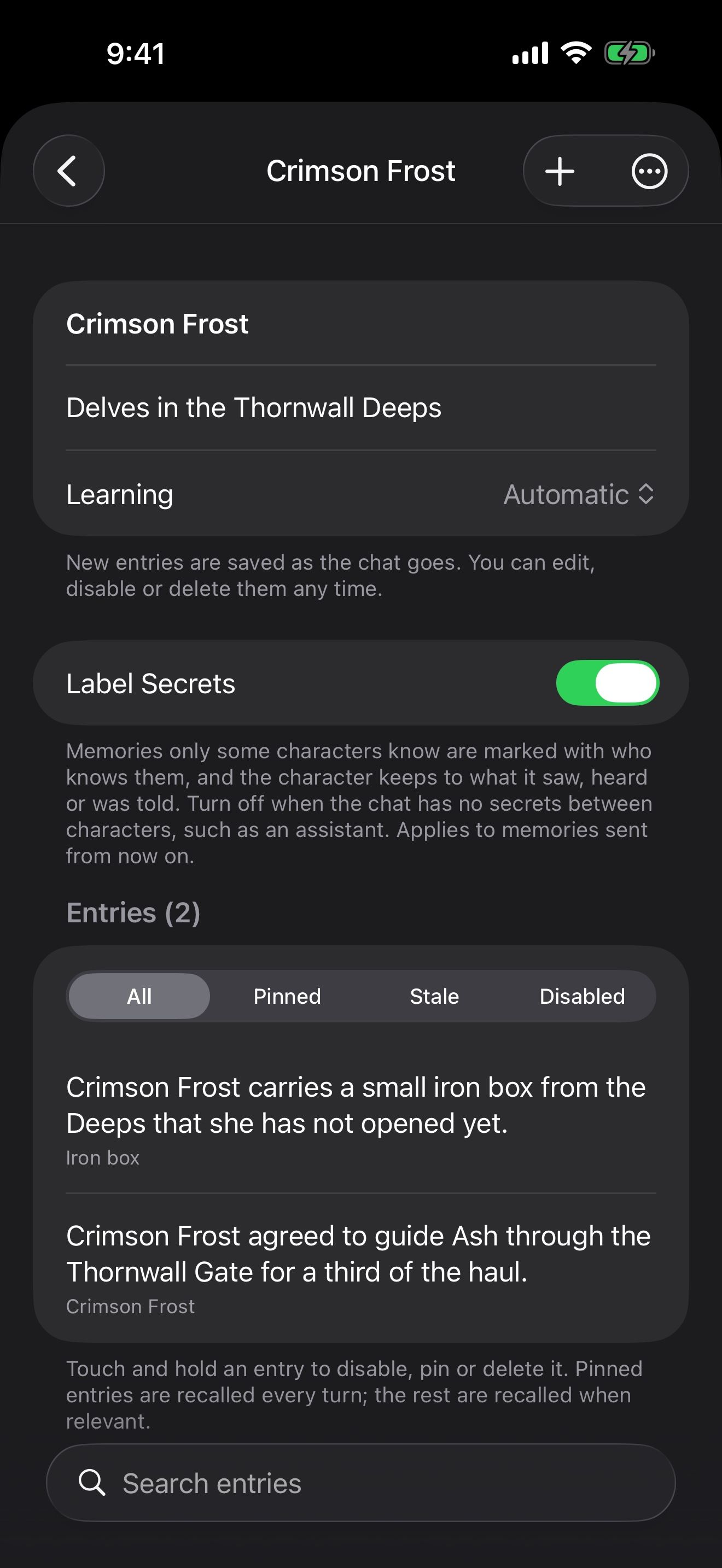
Open a memory to see every entry.
- Approve, Reject or Edit suggested entries, or Approve All.
- Edit or Delete any entry. Disable keeps an entry for the record but stops recalling it.
- Add Entry writes a fact yourself.
- Pin: Recall Every Turn brings an entry back in every reply, such as what the character calls you.
- Find Duplicates finds repeated entries.
- Label Secrets marks entries only some characters know, so each character keeps to what it saw, heard or was told.
In a chat, a brain in the header shows what was learned and recalled in that chat.
Long chats
A summary condenses a long chat. In History, long-press a chat and choose Create Summary. In a memory, Add From Summary turns the summary into entries, so a new chat can pick up where the old one ended.
If you attach a memory to a chat that already has history, it offers to Catch Up on the earlier messages.
Where memory runs, and what it costs
Memory is free. A memory learns with the chat’s own model, or with Apple Intelligence (on device) on devices that support it. Recall always runs on your device.
Memories are stored on your devices and in your own iCloud account. To write a reply, the entries recalled for it go to the AI service the chat uses, along with your messages.
Export and import
Memories can be exported and imported as files, and duplicated to try a story in a new direction without touching the original. The steps are in Memory: characters who remember.
Questions
Can I edit what the character remembers?
Yes. Open a memory to see every entry. You can edit, delete or disable each one, add entries of your own, and pin the ones that should come back in every reply. With Learning set to Suggest, a new entry is used only after you approve it.
Does it summarize long chats so characters don't forget?
A memory keeps learning facts as a chat goes on, so they outlast the chat. You can also create a summary of a long chat from History, and Add From Summary turns that summary into memory entries a new chat can recall.
Is there an AI companion app on iOS with memory I control?
Character Agent, on iPhone and iPad. You choose how each memory learns (automatically, with your approval, or only when you ask), how many entries are recalled in each reply, and which entries are pinned. You can read, edit, export and delete everything it holds.
Is memory free?
Yes. Memory is free, like every feature in the app. Learning uses your chat model, or Apple Intelligence on devices that support it. Recall always runs on your device.
Can I export or back up a character's memories?
Yes. Export a memory as a file from Settings › Memories, and import it again on any device. Memory: characters who remember has the steps.
Step by step in the guides
Memory: characters who remember
How memories learn and recall, and how to review, pin, edit, import and export their entries.
A character who remembers you
Give a character a memory that learns from your chats, check what it learns, and use it in new chats.
Memory · Launchers · Memory files · Chat history · Check-ins